
The interesting thing about edgeful isn’t whether it’s good. It’s the gap between the two plans.
$49/month gets you the entire data and analytics platform. $299/month adds automation. That’s a 6x jump, and which side of it you belong on is genuinely the whole decision here. Most reviews skip past that. It’s the only question worth spending time on.

Prop Firm App is reader-supported. If you click on a link, our partners may compensate us.
What This Actually Is
edgeful is a web-based data analytics platform. Not a broker, not a prop firm, not a charting package, not a signal service. It sits alongside TradingView, NinjaTrader, Tradovate and ProjectX rather than replacing any of them.
The question it answers is narrow and useful: how often has this setup actually worked?
Coverage spans 3,000+ tickers across futures, stocks, forex and crypto, built on 7+ years of historical data sourced from the exchanges. Futures is plainly where the product lives though. Browse the report library and you’re looking at ES, NQ, MES, MNQ, YM, RTY, CL and GC in nearly every example. If futures isn’t your market, a good chunk of the value evaporates.
The Report Library
150+ pre-built probability reports form the core. Gap fills, opening range breakouts, initial balance breakouts, engulfing candles, opening candle continuation, inside bars, fair value gaps, ICT opening retracements, ADR and ATR, seasonality, pivot points, power hour breakouts, CPI and FOMC and NFP reaction data, overnight range breakouts, market session correlation.
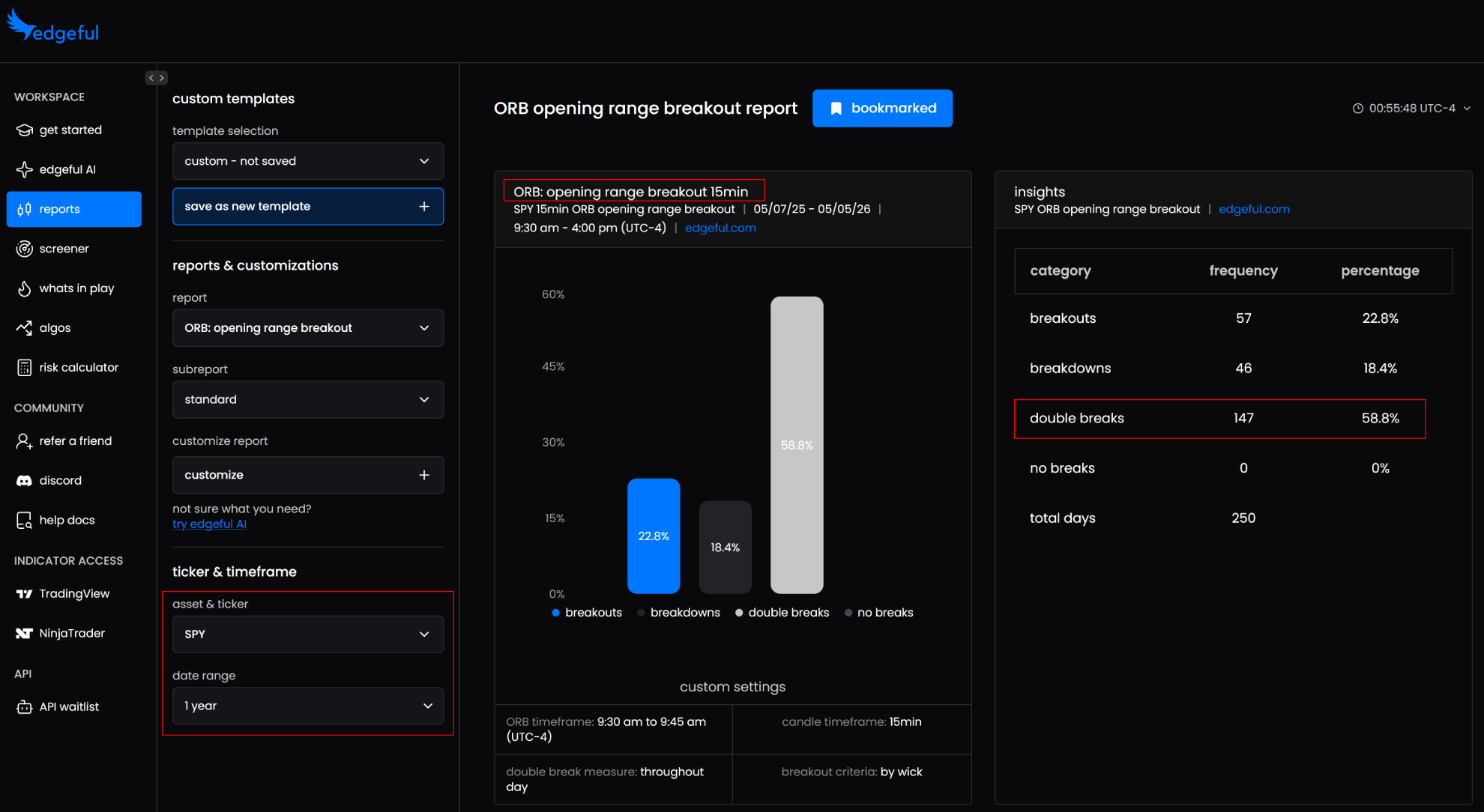
Workflow is pick an asset class, pick a ticker, pick a strategy, set a look-back window, read the result. No coding, no spreadsheet work.
A concrete one makes the point better than a description. The opening candle continuation report on NQ, New York session, over a 6-month window: when the first hour closes green, the session closes green 76% of the time. That’s not a subtle edge. It’s the difference between fading an opening move and going with it, and it takes about ten seconds to look up.
Subreports are where it gets genuinely useful. Any report filters down by weekday, direction, size, retracement level, fill time, gap type, rejection, formation time. The initial balance breakout report alone breaks out by breakout, close, colour, double break, formation time, gap type, levels, overnight session, performance, rejection, retracement, size, time and weekday.
Why does that depth matter? Because “IB breakouts tend to run” isn’t a tradeable statement. “After an upside IB break on ES on a Tuesday following a gap up, price retraced to the 50% level X% of the time” is. That’s the difference between a vague bias and knowing where the stop goes.
Every report page carries explainer videos at the bottom covering what the report measures and live chart examples, which matters more than it sounds given how many reports there are to work through.
Customisation runs further than most people will use: custom market sessions beyond the pre-built London, NY and Asia windows, custom look-back periods to check whether probabilities have shifted recently versus the full history, custom report inputs, saved templates you can reload in one click, and custom watchlists. Subscribers can also request new reports and new indicators be built.
The Daily Workflow Tools
Here’s the thing about 150+ reports: nobody checks them all before the open.
What’s in Play solves that. It scans the reports you’ve selected across your tickers, filters by whatever probability threshold you set, and surfaces only what’s currently setting up, with auto-calculated probabilities, biases and targets on live data. Setups show as forming, in play, or completed, with a bias bar running across the top. That completed status matters more than it sounds, because jumping into something that finished an hour ago is a common and expensive mistake.
What it looks like in practice: ES opens below yesterday’s low by 0.1% to 0.19%, and the dashboard flags that every instance of that condition in the past 6 months reversed back into yesterday’s range. You get a long bias with a sample size attached, three minutes after the open, without having gone looking for it.
The Daily Bias Screener does a different job: broad session direction rather than individual setups. The useful wrinkle is that it isn’t limited to what you trade. The default daily bias template runs live data across the major market movers, Apple, Amazon, Broadcom, Google and the rest, to produce a market-wide read. If you want to short NQ and the entire mega-cap complex is showing long bias, that’s worth knowing before you size in.
One practical limitation: the screener takes roughly an hour of session data to form. It isn’t a pre-open tool. What’s in Play is what you check at 9:30; the screener is what tells you whether the session’s character matches your bias once it’s had time to develop.
Real talk on the screener: if you’ve spent years building your own pre-market process, the marginal gain is smaller. Where it earns its place is for traders who don’t yet have a systematic bias framework and are currently substituting gut feel.
edgeful AI
Launched in 2026, and the design choice that matters is that it queries edgeful’s own report data rather than general internet knowledge. Ask a general-purpose chatbot whether gaps fill on NQ and you get something plausible with no sample size. Ask this and you get numbers pulled from the platform’s reports with the source reports cited.
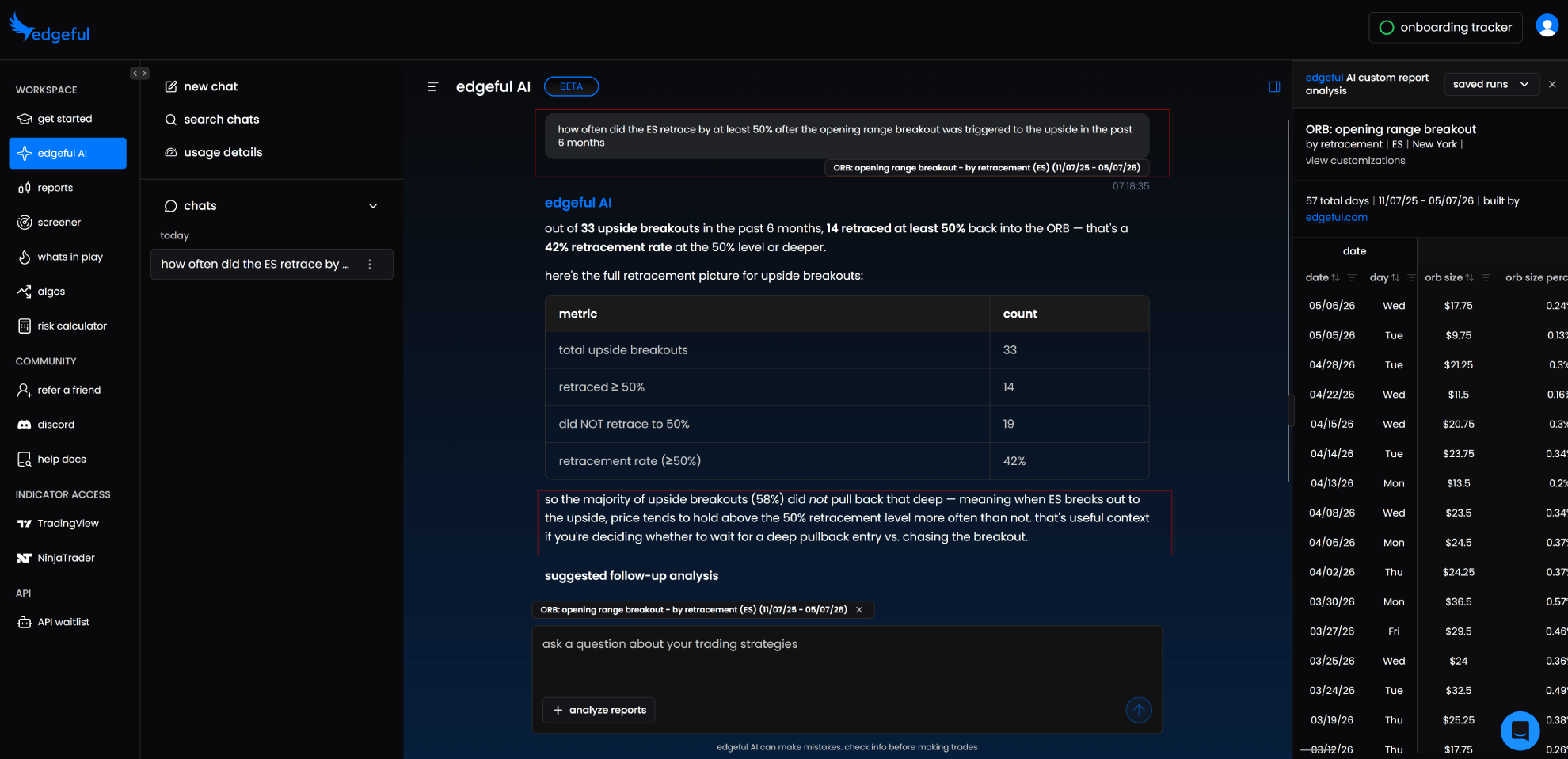
It reads across 16 reports simultaneously, which is the part that would take most of a morning to do manually. The workflow is load a report, then interrogate it. Load the NQ initial balance report over 6 months, ask which weekdays double break the most, and get back that Tuesdays account for 35% of all double breaks. That’s a Tuesday-specific adjustment to how you’d trade an IB break, derived in seconds from a question you could phrase in plain English.
Beyond the obvious lookups, it takes open-ended questions. If you know you consistently lose on days when the IB breaks to the downside, asking what other conditions cluster with downside IB breaks is a legitimate research question that the reports alone won’t answer without a lot of manual cross-referencing.
It’s new. How it holds up on edge cases and less common setups is not something anyone can tell you yet.
Indicators
50+ TradingView indicators and 12+ NinjaTrader indicators, available on both tiers and exclusive to subscribers.
They auto-plot the levels from the reports directly onto your charts. The ORB indicator draws the opening range with extension and retracement levels plus a live stats dashboard. ORB by R/R plots 1R, 2R and 3R targets off the range size. The IB indicator does the same for the first hour. Gap fill comes in several variants including by close, by session, by spike, and size extensions.
For ICT-style traders there’s fair value gaps, order blocks, ICT opening retracement, and the ultimate reversal setup, which plots prior session high, low, close and midnight open. The VWAP suite covers NY open, daily and weekly. HTF candles overlays higher timeframe candles onto your current chart.
The practical value during an evaluation is unglamorous: less drawing, less to forget, fewer mistakes on mornings when you’re rushed. Over a 10-day challenge that consistency compounds.
All included at $49/month.
The Algo Layer
Seven strategies currently ship on the All Access tier: gap fill, ORB, ORB 2TP, break even IB, IB break even, and two engulfing candle variants. More get added over time and existing subscribers get them at no extra cost. Fully customisable rather than black box: you set profit target, stop loss, direction and session parameters, then backtest before risking anything.
The published backtest is an IB strategy on GC futures from January 2025 to January 2026: 403 trades, 65.76% win rate, 1.935 profit factor, 11.60% max drawdown, +$105,890 net P&L. Worth reading the fine print on that one. It’s edgeful’s own backtest, run on TradingView using default settings, and they state plainly that past performance isn’t indicative of future results. Treat it as a demonstration of what the backtester reports, not as a return you should expect.
Algo templates ship alongside, which are pre-configured setting bundles for getting started quickly rather than building from scratch.
The Optimizer
This is the strongest piece of the plan, and the reason is boring and practical.
Anyone who has built strategies in TradingView knows the grind: change the profit target, rerun, change the chart timeframe, rerun, change the session, rerun. Finding decent settings for one algo on one ticker can eat a weekend. Comparing that algo across NQ, ES, YM, RTY and GC multiplies the problem by five.
The optimizer collapses it. Pick ticker, backtest timeframe, execution timeframe and entry/exit parameters, and it sweeps up to 10 million combinations across every weekday, returning ranked results scored on reliability rather than raw profit. Configuring a run takes under a minute. The output includes the exact algo settings to paste into TradingView, so there’s no translation step.
Ranking by score rather than P&L is the right design decision, because the highest-earning parameter set in any backtest is frequently the most overfit one.
The important caveat comes from edgeful directly: optimizer output is a foundation, not a finished strategy. These aren’t plug-and-play, and the recommendation is to treat the results as a starting point that still needs your own customisation, backtesting and iteration. A vendor telling you not to just run their output is a better signal about the tool than any performance number on the page.
The Prop Firm Validator
This is the feature that should matter most to anyone reading this on a prop trading site.
Run your backtested strategy against a firm’s actual challenge rules, profit target, max drawdown floor, minimum trading days, and get a simulated pass rate before you buy in. It runs off the Monte Carlo output, and it tests against specific account types and sizes rather than a generic ruleset, so a 50K evaluation and a 150K evaluation return different answers for the same strategy. It also flags when your position sizing is the thing breaking the simulation.
The published examples land around 59% to 66% depending on account type, with average trades to pass and a fastest path shown alongside. Note what edgeful does with those numbers: a 59.2% result gets labelled a coin flip in their own scoring, and their framing on a 66% pass rate is that you’re still losing four evaluations out of ten. That’s a considerably more sober read than most vendors put on their own screenshots.
Think about what that changes. Instead of buying challenge after challenge with a strategy never stress-tested against drawdown rules, you get the odds first. A strategy simulating at 5% is one you now know not to fund.
The Analyzer
Here’s the part the marketing undersells: the Algo Analyzer takes any TradingView backtest, not just edgeful strategies. Export the file from TradingView, upload it, and get back analysis TradingView itself doesn’t produce.
That list is worth reading if you already run your own systems: average winner, max losing streak, strategy health, performance decay, best and worst weekdays, concentration risk, return consistency, and a suggested max loss derived from where your losing trades actually cluster. The stress test scores each of those pass or fail rather than dumping numbers on you.
Monte Carlo runs 1,000 randomised simulations through your actual trade history. A worked example on the platform shows an actual result near $9,000 against a worst-5% outcome around $1,400 and a best-5% around $16,000. Seeing that spread is the point. A strategy that returned $9,000 once but has a worst case near zero is a different proposition from one with a tight distribution, and a single backtest number hides that completely.
So even if you never touch an edgeful algo, the analyzer is a legitimate reason to consider the tier if you’re already building strategies elsewhere.
Broker connection runs through NinjaTrader and Tradovate, with prop firm compatibility via ProjectX hosting. Multiple prop accounts, multiple cash accounts and multiple strategies can run simultaneously from the dashboard, with a trade log tracking executions. Trades fire on signal with sub-second placement, and strategies pause or resume individually. edgeful puts average setup time at around an hour.
The plan also includes an algo education library covering every strategy plus optimisation, automation and position sizing, one monthly one-on-one call to review your settings, a private Discord for algo subscribers, and full API access.
Pricing
Essential, $49/month, or about $399 billed annually. Full report library, subreports, What’s in Play, Daily Bias Screener, edgeful AI, 50+ TradingView indicators, 12+ NinjaTrader indicators, custom sessions and templates, Discord access, weekly streams, economic calendar, risk calculator, newsletter, and limited API access covering 4 tickers, 3 reports and 6 months of history.
All Access, $299/month, or about $2,399 billed annually. Adds the algos, the optimizer, the analyzer with Monte Carlo and the prop firm validator, automated broker execution, mobile alerts, monthly one-on-one optimization calls, custom algo requests, an algos-only Discord channel, and full API access across 3,000+ tickers, 150+ reports and 8 years of history with live data.
The API is the sleeper feature on that tier. It pulls edgeful’s data into whatever you want to build, and it’s designed to work with coding assistants like Claude Code or Codex, so a custom pre-market dashboard comparing ES and NQ side by side is a realistic weekend project rather than a development effort. If you’re the sort of trader who already builds your own tooling, that changes the value calculation on the upgrade independently of the algos.
Both plans are paid from day one. A free resources section covers a 5-day futures course, a risk calculator, and several strategy playbooks if you want to sample the approach first.
So Which Tier
Essential is straightforward value if you trade CME futures. The report depth on gap fills, opening range and initial balance setups is hard to reproduce manually, and the indicators alone save real time every morning. For most subscribers this is the right plan and the end of the decision.
All Access is the harder call, and the usual framing gets it slightly wrong. The question isn’t only whether you’ll automate. Three separate things justify that tier independently: running the algos, using the analyzer on strategies you built yourself elsewhere, and the API if you build your own tools. Any one of them can carry it. None of them can if you’re buying on the assumption you’ll get around to it eventually, because $299/month for features you don’t open is a bad trade no matter how good they are.
For prop traders specifically, the validator is the strongest single argument. It targets the exact failure mode that drains the most money from this audience, which is discovering after you’ve paid that a strategy was never going to survive the drawdown rules.
The honest caveat applies to both tiers: this is a research tool, not an edge. It tells you what has happened. What you do with that at 9:30 is still on you. And the algos are explicitly not a set-and-forget product, which is worth taking at face value rather than as false modesty.
Beginners should expect a learning curve. 150+ reports is a lot of surface area, and working out which handful actually matter for your strategy takes time. There’s an essential walkthrough and an advanced walkthrough on the get started page, plus explainer videos on individual reports and algos. Working through the essential track before clicking around saves more time than it costs.